
I Asked 100+ Senior Engineers to Re-Hash Facebook’s Passwords. Not One Nailed It.
The zero-downtime password migration question that 99% of engineers fail — the full solution, the traps that sink candidates, and how juniors, seniors, and staff are scored.

There’s one question I’ve asked in interviews more times than I can count. It sounds almost too easy when you first hear it. No distributed consensus, no leaderboards, no “design YouTube.” Just one table and one bad decision made a long time ago.
Here’s how I frame it:
“Imagine it’s 2004 and you’re one of the first engineers building Facebook. You made a mistake early on: every user’s password is stored in the database as plain text. It’s now years later, you have millions of active users, and you’ve just realized what you did. Walk me through how you’d migrate all of those passwords to a secure form — with zero downtime, and without forcing every user to reset their password at once.”
That’s it. That’s the whole prompt.
I’ve now asked this to more than a hundred senior engineers. Not one of them gave me an answer I’d call complete. Around five got as far as the key insight — the dual-write trick I’ll walk through below — but not a single person walked the full path without me dragging them down it.
That gap is exactly why I love this question. It looks like a trivia question about hashing. It’s actually a question about how you think when the constraints are real, the data is dirty, and the easy answer is a trap. Let me show you what I mean.
The trap is in the wording
Read the prompt again. I said, “Migrate all of those passwords to a secure form.” In the room, I usually say “encrypted.”
That word is bait.
You do not encrypt passwords. Encryption is reversible by design — give it the key and the ciphertext comes right back out as plaintext. Which means if someone walks off with your database and your key (and the key is almost always nearby), every password is exposed again. You’ve moved the problem, not solved it.
What you want is a one-way cryptographic hash — specifically a slow, salted password hashing function like bcrypt, scrypt, or Argon2id. These are built so that:
The same input always produces the same output (so you can verify a login).
You cannot run the function backwards to recover the input.
They’re deliberately slow, which makes brute-forcing stolen hashes painfully expensive.
The first real signal I’m watching for happens in the first thirty seconds. The strong candidates stop me: “Well, you wouldn’t encrypt them. You’d hash them, and you’d want a slow KDF, not something like SHA-256.” They corrected the interviewer before they wrote a single line. That’s a person who has the fundamentals deep enough to trust their own footing.
The candidates who confidently start describing AES and key rotation have just told me something important too.
The answers I hear that don’t work
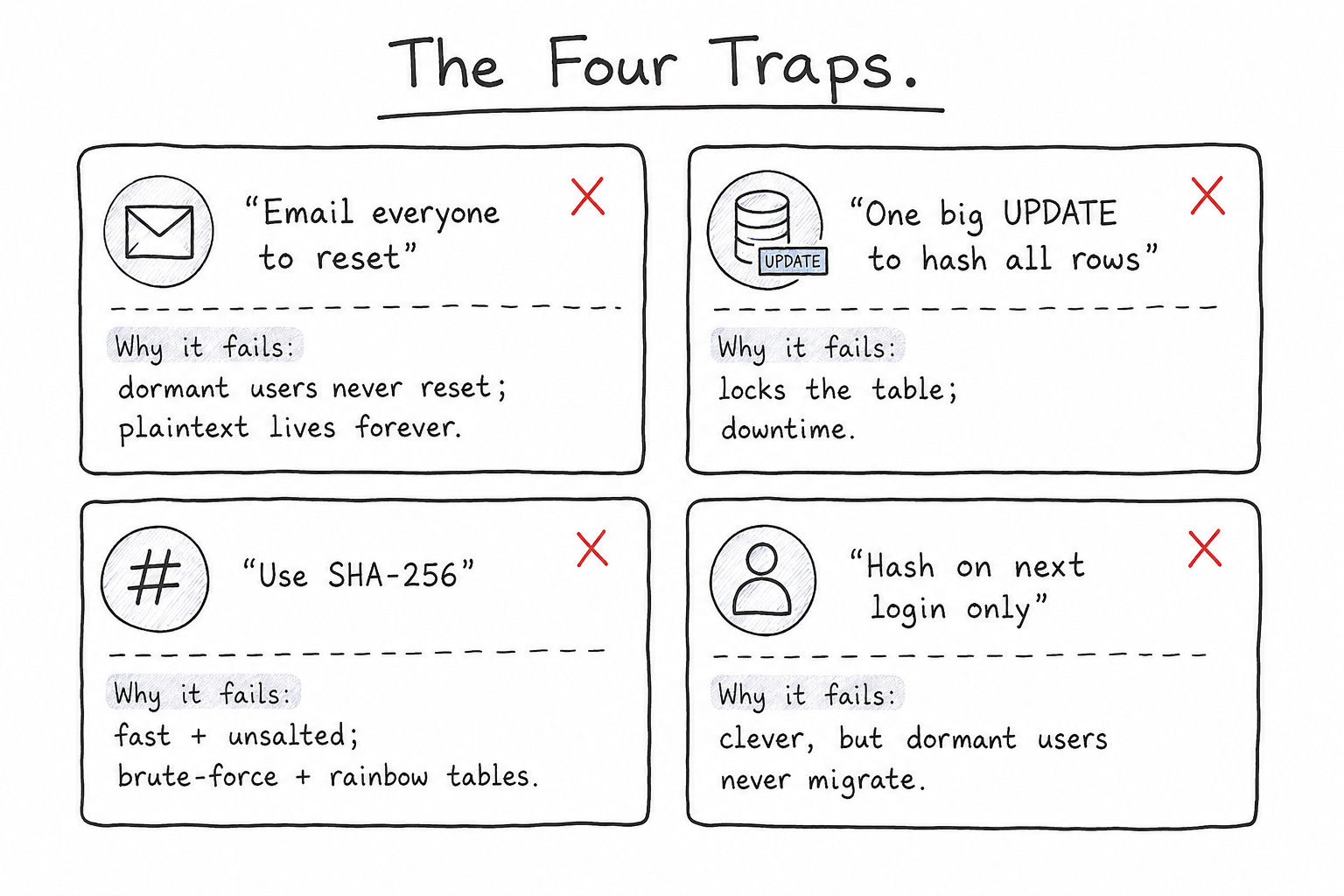
Before we build the right answer, let’s walk through the wrong ones — because they’re so common they’re practically a tour of the failure modes.
“Just email everyone and make them reset their password.”
This is the single most common first answer, and it fails on the constraint I stated out loud. The prompt says no mass forced reset. But there’s a deeper problem the candidate usually misses: a huge fraction of your users will never open that email. They’re dormant. They signed up, drifted away, and won’t log in again for a year — if ever. Their plaintext passwords now sit in your database forever, waiting. You haven’t solved the problem; you’ve solved it for your active users and abandoned everyone else.
“Run a migration that hashes every password.”
Closer! The instinct is right. But then they reach for a single UPDATE over millions of rows in one shot. That locks the table, spikes replication lag, and takes the login path down with it. Zero downtime, gone. The mechanism was correct; the execution would page the whole on-call rotation at 2 a.m.
“Use SHA-256.” (Or worse, MD5.)
Fast hashes are the wrong tool. They’re built to be fast, which is exactly what an attacker with a stolen table wants — they can try billions of guesses per second. And without a per-user salt, identical passwords produce identical hashes, so a single precomputed rainbow table cracks them in bulk. “Hash it” is half a fundamentals point. “Hash it with a slow, salted KDF” is the whole point.
“Hash the password the next time each user logs in.”
Now we’re getting somewhere — and this is the answer that traps the good candidates. The idea: you still have the plaintext, so when a user logs in, verify them against it, then quietly replace their stored value with a proper hash. Elegant. Zero disruption. Migrates users exactly when they show up.
It’s also incomplete in the exact same way the email approach was: dormant users never log in, so their plaintext never gets migrated. A candidate who proposes lazy-on-login and stops there has built something genuinely clever that still leaves a pile of plaintext in your database indefinitely. When I push — “what about the user who never comes back?” — this is where most people stall.
The handful who got furthest had already reached the dual-write idea — but even they usually stalled right here, on the dormant users.
Building the answer from first principles
Forget the clever tricks for a second and reason about what actually has to be true.
You have a table with plaintext. You want to end in a state where (a) every password is stored as a salted slow hash, (b) the login path never breaks, not even for a second, and (c) when you’re done, no plaintext remains anywhere. And you have to get from here to there while the system is live and users are logging in, signing up, and resetting passwords the entire time.
That last clause is the one people forget. The migration isn’t a single event — it’s a window during which the system must continue operating in a half-migrated state. So the real design question is: what does each code path do while plaintext and hashes coexist?
Here’s the sequence I’m hoping to hear, in order.
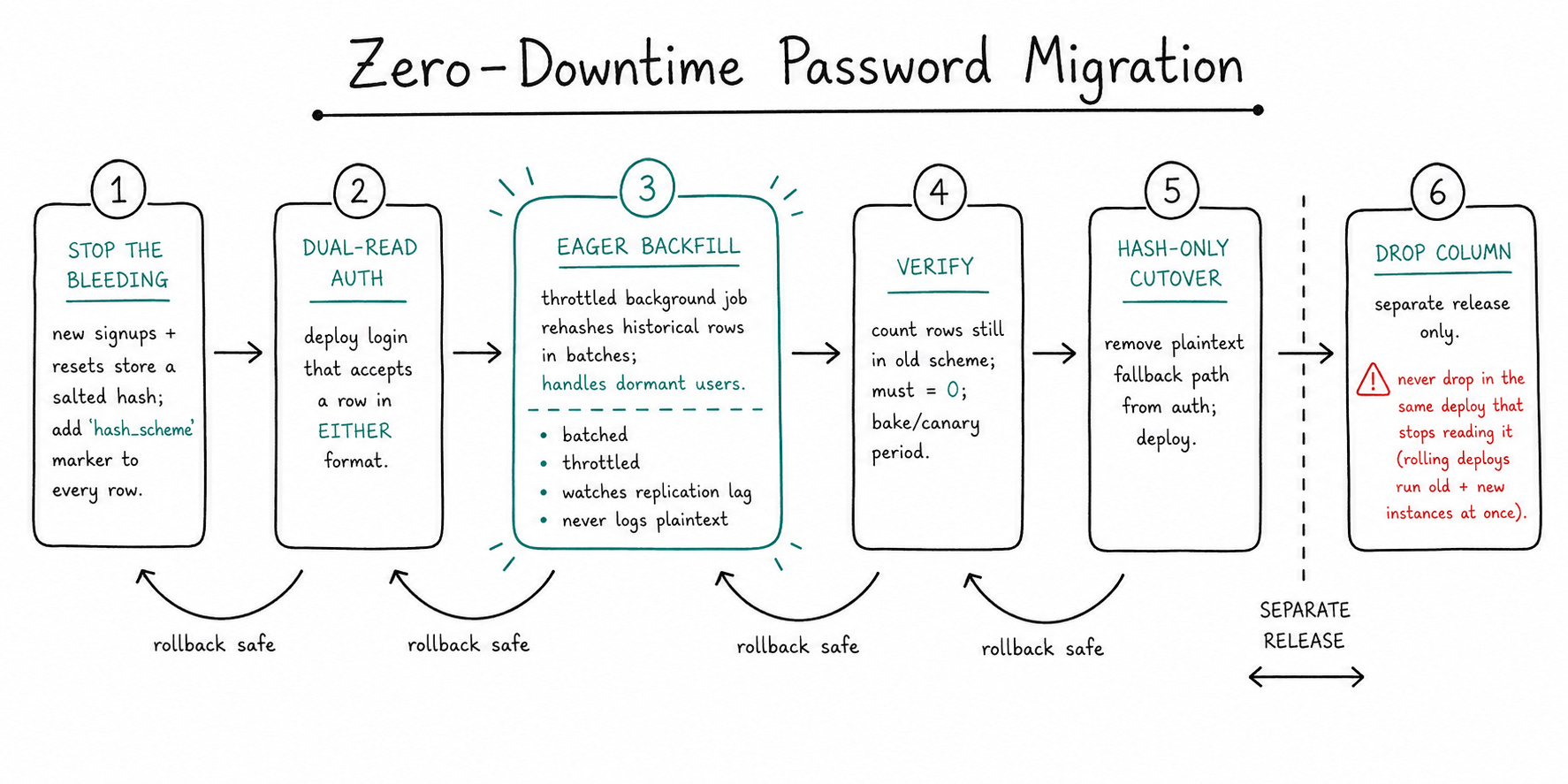
Step 1: Stop the bleeding
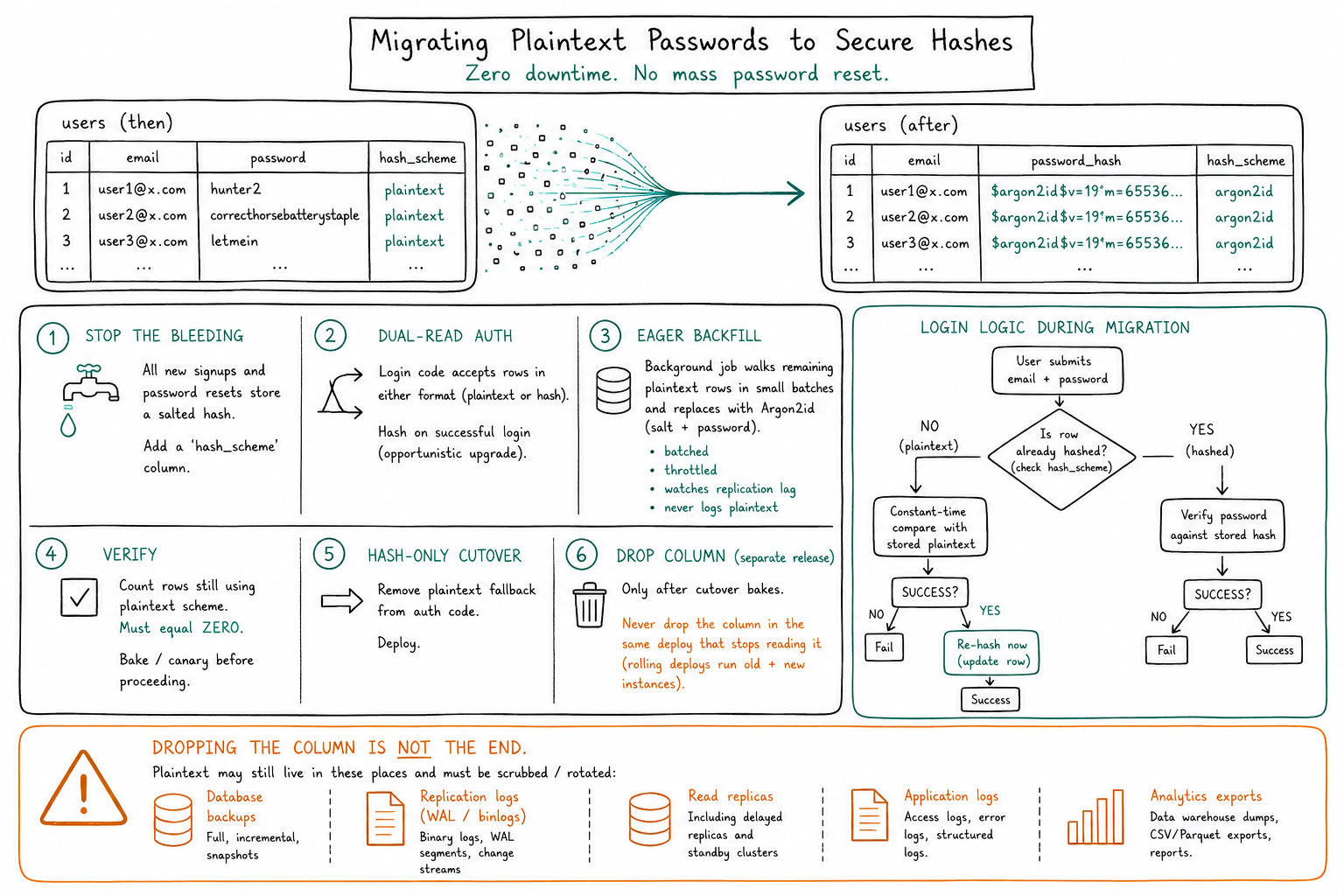
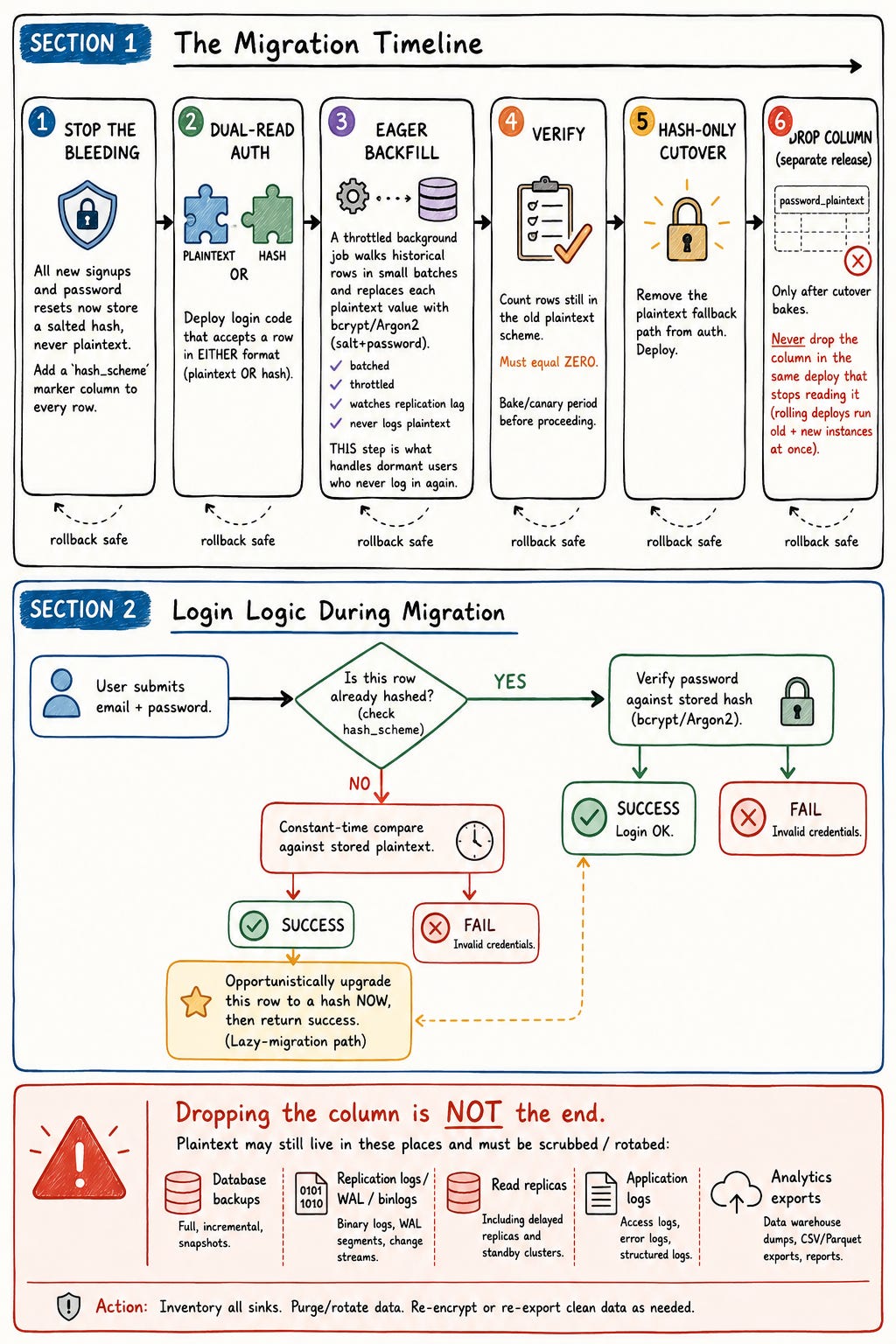
Before you migrate a single old row, change the write path. From this moment forward, every new signup and every password reset stores a properly salted hash — never plaintext again. Add a marker on each row (a hash_scheme or auth_version column) so the system always knows how a given row is stored.
This is the step almost everyone skips, and it’s the most important one. If you start a multi-day backfill while new plaintext is still pouring into the table, you’re bailing water with the tap running.
Step 2: Make the login path tolerant of both states
Deploy auth code that can handle a row in either format:
If the row is already hashed → verify against the hash, as normal.
If the row is still plaintext → verify against the plaintext (using a constant-time comparison so you don’t leak anything through timing), and on success, opportunistically upgrade that row to a hash right then.
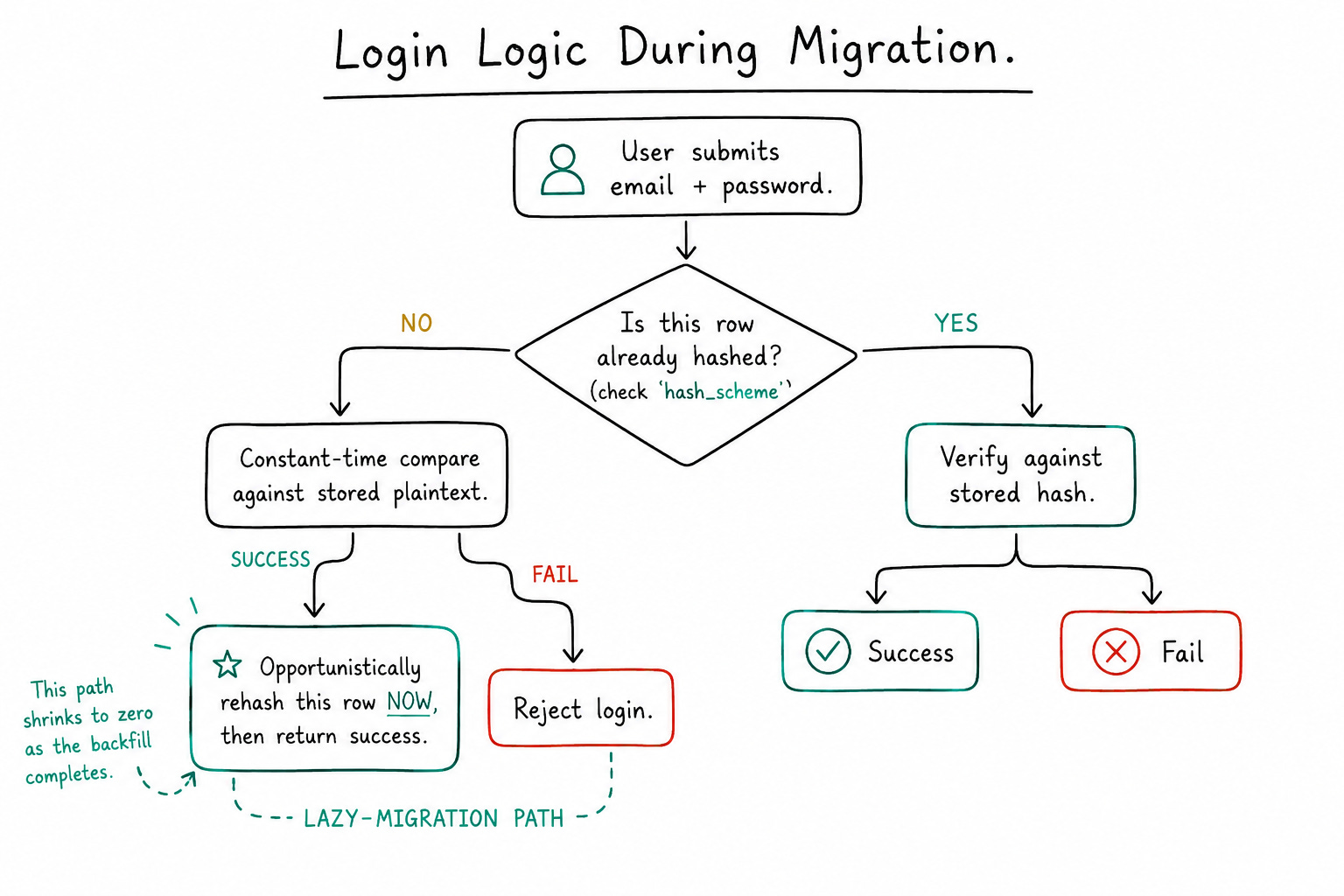
This is the lazy-on-login trick — but now it’s a safety net, not the whole plan. It means active users migrate themselves the instant they show up, and it makes the next step safe to run at any speed without racing the login path.
Step 3: The eager backfill — this is the part the dormant-user trap is testing
Run a background job that walks the historical rows and replaces each plaintext value with its salted hash. The key is how you run it:
Batched — a few hundred to a few thousand rows at a time, not one giant transaction.
Throttled — watch replication lag and DB load; back off when either climbs.
Off-peak where you can, and idempotent so you can stop and resume safely.
Never pull all the plaintext to one machine or log any of it — process it in place, in batches, and let it disappear.
This is what handles the dormant users. You are not waiting for them to come back. You’re proactively hashing everyone, so within a bounded window the plaintext is gone whether a user ever logs in again or not.
A nice nuance some candidates raise: bcrypt silently truncates inputs past 72 bytes, so if you want to be safe against unusually long passwords you pre-hash with SHA-256 first — bcrypt(sha256(plaintext)) — and then you must apply that same scheme consistently at login. It’s a small detail, but it tells me they’ve actually shipped this primitive, not just read about it.
Step 4: Verify before you do anything irreversible
Before you touch the plaintext column, prove the migration is complete: count the rows still in the old scheme. It should be zero. Keep a canary/bake period where the dual-read code is still deployed, just in case. Treat “every row is migrated” as a claim you have to measure, not assume.
Step 5: Cut over, then drop — as two separate deploys
Now flip auth to hash-only and remove the plaintext fallback path. Deploy that. Let it bake.
Only then, in a later release, drop the plaintext column.
This ordering is non-negotiable, and it’s a classic senior-vs-mid separator. You can never drop the column in the same deploy that stops reading it, because during a rolling deploy, you’ll have old and new instances running simultaneously — and an old instance that still expects the column will fall over the moment it’s gone. Schema changes and the code that depends on them ship in separate, backward-compatible steps. Always.
So the full arc is: stop new plaintext → dual-read auth → batched backfill → verify → hash-only cutover → drop the column (separately). Six steps, each one safe to roll back to the previous one.
The edge cases that actually separate people
If a candidate gets through the sequence above, I start pushing on the things that aren’t in the happy path. This is where even the strongest few ran out of road.
“You dropped the column. Is the plaintext actually gone?”
No. And this is my favorite follow-up, because it reveals whether someone thinks about a single table or the whole data lifecycle.
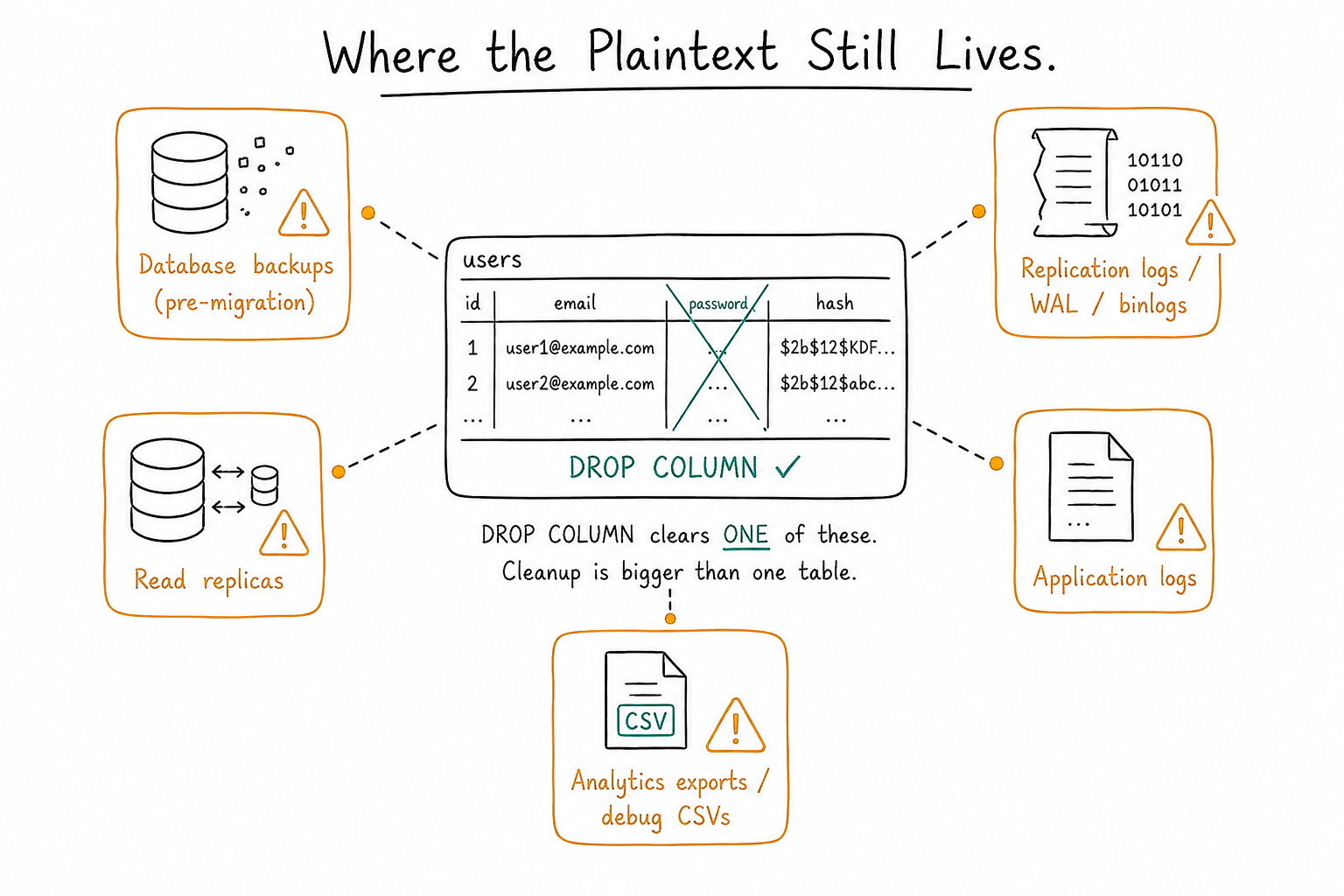
That plaintext didn’t only live in one column. It lived in your database backups from before the migration. It’s sitting in your replication logs / WAL / binlogs. It’s on every read replica. It may have leaked into application logs, an analytics pipeline, or a CSV some engineer exported to debug an issue three years ago. A single DROP COLUMN reaches exactly one of those places.
Senior candidates name this unprompted. They talk about rotating or expiring old backups, scrubbing logs, and accepting that “the column is gone” is the beginning of the cleanup, not the end.
“Walk me through the exact deploy ordering.”
Covered above — but I ask explicitly, because plenty of people who described the right steps can’t articulate why the column drop has to be its own release. If they can explain rolling deploys and backward compatibility from memory, that’s a strong senior signal.
“What if you want to increase the hashing cost in two years?”
The right answer is that you’ve already built the machinery for it. The same lazy-upgrade pattern from Step 2 generalizes: when a user logs in, check whether their hash uses the current work factor; if not, re-hash at the new cost and store it. The migration you just designed isn’t a one-off — it’s a reusable pattern for evolving your auth scheme over time. Candidates who see that have stopped thinking about this migration and started thinking about migrations as a capability.
The reframe that only staff candidates reach on their own
Here’s the thing none of the mechanics address, and the question I save for the end:
“Suppose the breach already happened. An attacker copied that plaintext table last week. Does your migration plan change?”
Watch what happens to the candidate’s frame.
The whole problem, up to this point, has been an engineering problem: migrate cleanly, no downtime, be elegant. But the passwords were exposed by design, for years. The plaintext existed, it was readable by anyone with database access, and it sat in backups and replicas the whole time. From a security standpoint, you should assume those credentials are already compromised — because for the entire history of that table, they effectively were.
That changes everything. A clean migration to bcrypt doesn’t un-expose a password that’s already been read. So now it’s not a migration; it’s an incident. The right moves become:
Force a password reset (or invalidate sessions) for affected users — yes, the very thing the original prompt told you to avoid. A staff candidate will push back on the constraint once they realize the constraint conflicts with the actual threat.
Think about disclosure and what users and regulators need to be told.
Reason about blast radius: password reuse means this isn’t just your problem, it’s every other site where those users used the same password.
Bring up a pepper — an application-level secret added before hashing and stored outside the database (in a secrets manager) — so that a future database-only leak isn’t enough to start cracking.
The staff signal isn’t knowing more crypto. It’s the instinct to step back, challenge the premise of the question, and recognize that the elegant zero-downtime migration is solving the second most important problem. The most important one is that you have a liability that’s already out the door.
In over a hundred interviews, nobody has reached this on their own. Whoever does will be someone I fight to hire.
What I’m actually evaluating, by level
This is the part people ask me about most, so let me be concrete. The same question reads completely differently depending on the bar.
Junior — testing fundamentals and reasoning. I want to hear that passwords are hashed, not encrypted; that you’d use a slow salted KDF like bcrypt/Argon2 rather than SHA-256; and a coherent sketch of migrating on next login. It’s fine if they miss the dormant-user gap or the deployment mechanics — I’ll lead them there and watch how they react. What I’m really checking: do they have the security basics, and can they reason out loud without flailing? A junior who knows why SHA-256 is wrong is already ahead of most.
Mid — testing completeness and operational instinct. Everything above, plus they catch the dormant-user problem themselves and reach for an eager, batched backfill. They know a single giant UPDATE is a non-starter and talk about batching and throttling. They naturally stop new plaintext writes before migrating old rows, and they keep the login path working in the mixed state. A mid candidate sequences the migration sensibly without me holding the pen.
Senior — testing deployment safety and the data lifecycle. All of the above, plus they treat the production rollout as a first-class concern: multi-step deploys, backward compatibility, never dropping the column in the same release that stops reading it. They insist on a verification step before anything irreversible, they have a rollback story, and they recognize unprompted that plaintext leaks into backups, replicas, and logs — so cleanup is bigger than one column. A senior makes the irreversible steps boring and safe.
Staff — testing judgment and the ability to challenge the frame. Everything a senior does, and then they stop being an implementer and start being an owner. They independently reframe the migration as a security incident, push back on the “no forced reset” constraint when it conflicts with the real threat model, and reason about disclosure, session invalidation, peppers, and secret management, and password-reuse blast radius. They also see that the lazy-upgrade pattern generalizes to future work-factor rotation. A staff candidate drives the ambiguity instead of waiting to be driven.
The takeaway
The reason this question works isn’t the crypto. Plenty of people know what bcrypt is. The reason it works is that every constraint I stated — zero downtime, no mass reset, millions of existing users — is quietly steering you toward a trap, and the only way through is to keep asking “okay, but what breaks while this is running, and what’s still true after I think I’m done?”
That’s the muscle I’m testing. Not “can you recite the right algorithm,” but “can you hold a live system, dirty data, and an irreversible cleanup in your head all at once, and sequence your way out without anything going dark.”
If you’re prepping for interviews, here’s how to practice with it: don’t memorize the six steps. Take the prompt and try to break your own answer. What happens to the user who never logs in? What’s in the backups? What does a rolling deploy do to a column you just dropped? Was this ever really a migration, or was it an incident the whole time?
Get in the habit of asking those questions before the interviewer does. That’s the difference between the hundred who stalled and the answer none of them quite reached.
TL;DR
If this was useful, the same “stop the bleeding → dual-read → backfill → verify → cut over → clean up” pattern shows up in almost every live data migration you’ll ever run — schema changes, encryption-at-rest rollouts, ID format changes. Learn it once on passwords, and you’ll see it everywhere.
If you’ve read this far, we probably think about software the same way.
I’m Vinit Shahdeo, currently building and scaling AI-native backend systems in the information trading space. I write about distributed systems, system design, and engineering at scale.
If this article resonated with you, let’s connect at vinitshahdeo.com. And if you’re interested in engineering careers and developer growth, check out my book, Digital Footprint for Software Engineers.
See you in the next system design rabbit hole.